Automating Switch Provisioning with Python and Jinja2
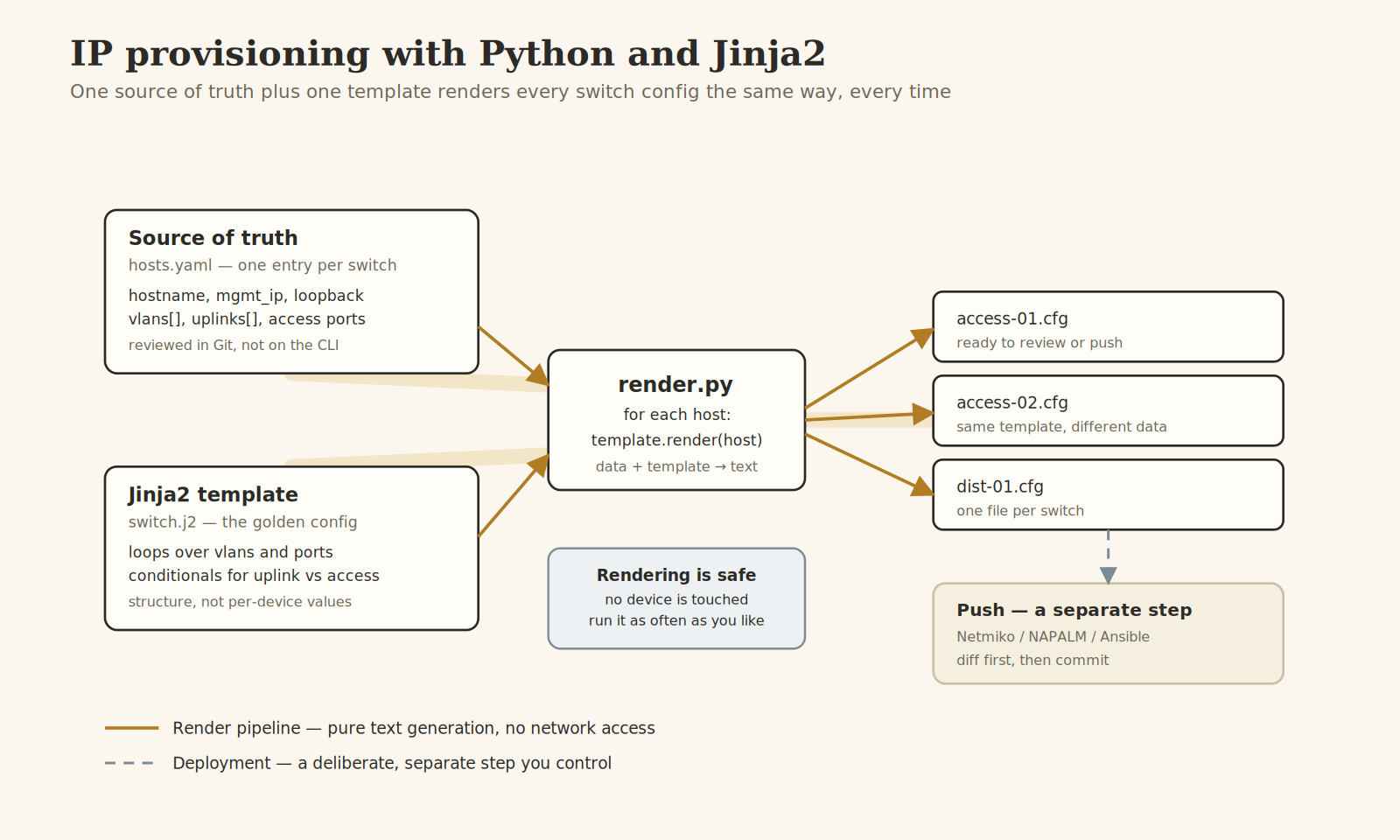
You have forty access switches to bring up and they are almost identical. Same VLANs, same uplink pattern, same hardening lines, same SNMP and AAA. The only things that change per switch are the hostname, a management IP, and which ports are trunks. Configuring that by hand forty times is not just slow, it is where the typos live: the VLAN that got fat-fingered on switch 23, the missing spanning-tree guard on switch 31, the description nobody updated. The fix is to stop treating a config as text you type and start treating it as text you generate.
The idea in one sentence
Keep the facts about each switch in one structured file, keep the shape of the config in one template, and let Python multiply them together. The facts are data, the config is a template, and rendering is a pure function that turns data plus template into text. Nothing touches a switch until you decide to push, which is a separate step entirely, as the pipeline at the top of this article shows.
This is exactly how Ansible builds device configs under the hood, but you do not need Ansible to start. Two Python files and a data file are enough, and understanding the mechanism first makes the Ansible version make sense later.
Separate the data from the template
The single most important decision is what counts as data and what counts as template. The rule of thumb: if a value differs between two switches, it is data. If a line is the same on every switch, it belongs in the template. If a block repeats with different values, it is a loop in the template driven by a list in the data.
Here is a source of truth for one switch in YAML, chosen because it is easy to review in a pull request. Each switch is a top-level key; under it sit its management address and a list of VLANs, each VLAN being an id and a name.
access-01: {mgmt_ip: 192.0.2.11, mgmt_mask: 255.255.255.0,uplinks: [Gi1/0/49, Gi1/0/50],vlans: [{id: 10, name: USERS}, {id: 20, name: VOICE}, {id: 99, name: MGMT}]}
Notice what is not in there: no VLAN command syntax, no spanning-tree keywords, no interface configuration mode. Just the facts. Someone who has never seen IOS could review this file and confirm that access-01 has the right management IP. This is written in YAML flow style, with the lists and VLAN entries wrapped in brackets and braces so the structure survives copy-paste. The more common block style, one item per indented line, works just as well in your own file as long as you use two spaces per level and never tabs.
Write the template as the golden config
The template is a real switch config with the per-device values punched out and replaced by placeholders. Jinja2 marks a value to insert with double curly braces, and marks logic like loops with a brace-and-percent. A simple template with no repetition looks almost like the finished config:
hostname {{ name }}interface Vlan99ip address {{ mgmt_ip }} {{ mgmt_mask }}
A loop expands the VLAN list into as many blocks as the data provides. The for and endfor lines are logic, so they use the brace-percent form and produce no output of their own. Everything between them repeats once per item, with the loop variable giving access to each VLAN's fields:
{% for v in vlans %}vlan {{ v.id }}name {{ v.name }}{% endfor %}
The uplinks work the same way, driven by the list in the data, so a switch with two uplinks gets two trunk stanzas and a switch with four gets four, from the same template:
{% for port in uplinks %}interface {{ port }}switchport mode trunk{% endfor %}
The template captures the intent once. Every switch that renders from it is guaranteed to have the same structure, so the class of bug where switch 31 is subtly different from switch 30 simply cannot occur. Where the real config indents interface sub-commands, keep that indentation in the template file itself; it is the rendered output that carries it through, not anything you pass from Python.
The renderer is a dozen lines
The Python that ties them together is short and boring, which is the point. It loads the data, loads the template, loops over the hosts, and writes one file each. Reading it top to bottom: build an environment, get the template, load the YAML, then render once per host into its own file.
env = Environment(loader=FileSystemLoader("."), trim_blocks=True, lstrip_blocks=True)template = env.get_template("switch.j2")hosts = yaml.safe_load(open("hosts.yaml"))for name, data in hosts.items(): open(f"out/{name}.cfg", "w").write(template.render(name=name, **data))
The two Environment options earn their place. Without trim_blocks, every for and if line leaves a blank line in the output where the tag used to be, and your config ends up full of gaps. Without lstrip_blocks, the indentation you use to make the template readable leaks into the rendered config. Set both and the output looks like a config a careful human wrote, not like machine sludge.
Run it and you get one file per switch in the out directory. Open one and read it. That review step, a human reading generated text before it goes anywhere near a device, is the whole safety model.
Guard rails that pay for themselves
Fail loudly on a missing value
By default Jinja renders a missing variable as an empty string, so a typo in a variable name produces a config with a blank where an IP should be, and you will not notice until the switch is unreachable. Pass StrictUndefined when you build the environment and a missing value stops the run with an error that names the variable instead.
env = Environment(loader=FileSystemLoader("."), undefined=StrictUndefined, trim_blocks=True, lstrip_blocks=True)
This one change turns a silent production incident into a loud failure on your laptop. It is the highest-value line in the whole pipeline.
Validate the data before you render
The template trusts its data. A VLAN ID of 5000 or a management IP with a typo will render into a perfectly formatted, completely wrong config. A few lines of checking before the render loop catch it while it is still cheap. A bare assert that every VLAN id falls between 1 and 4094 is enough to stop a fat-fingered 5000 from ever reaching a template, and it costs you one line per rule.
Diff, never blind-push
Rendering is safe because it only writes files. Pushing is where you can take a network down, so keep it a distinct, deliberate action. Render into a folder that is tracked in Git, commit, and your diff shows exactly what changed before anything reaches a switch. When you do push, tools like Netmiko, NAPALM or Ansible can show a config diff against the running device first. NAPALM in particular will tell you what it is about to change and let you confirm or discard.
Where this scales to
Once the pattern clicks, the source of truth grows into the interesting part. Pull the host data from NetBox or an IPAM instead of a hand-edited file and the addresses come from the same system that hands them out, so provisioning and documentation can never drift apart. Add a second template for your distribution layer. Render into a Git repository and let a pipeline open the pull request. The template and the renderer barely change; it is the data source that matures.
The mental shift is the valuable bit. A device config stops being something you type into a terminal and becomes an artifact you generate from reviewed inputs, the same way software is built from source rather than edited in production.
The takeaway
Data plus template plus a tiny renderer replaces error-prone hand configuration with something repeatable and reviewable. Keep per-device facts in a structured file, keep the config shape in a Jinja2 template, turn on StrictUndefined so mistakes fail loudly, and keep pushing as a separate step behind a diff. To try it, take one real switch config you already trust, split it into a template and a one-host data file, and render it back out. When the generated file matches the original you started from, you have a pipeline you can point at the next forty.